

Download JPEGView Portable – Lightweight Image Viewer, EXIF Data, Portable Tool
Overview
JPEGView Portable is a streamlined image viewer designed for users who prioritize efficiency, portability, and essential functionality. Built as a lightweight alternative to default image viewers on Windows systems, it caters to both casual users and professionals seeking a no-frills solution for viewing and managing digital images. The app’s primary purpose is to provide fast access to image files with minimal system overhead, making it ideal for environments where performance and resource usage are critical.
It addresses common pain points such as slow loading times, bloated interfaces, and the lack of metadata support in standard viewers. By offering features like EXIF data viewing and automatic color correction, JPEGView Portable enhances the user experience beyond basic image display. This makes it particularly valuable for photographers, digital archivists, and anyone who needs to review image details without launching heavy editing software.
The application is designed for portability, meaning it can be run directly from removable storage devices like USB drives or SD cards without installation. This feature supports users who work across multiple computers or prefer not to modify system settings. Although the developer did not provide additional technical details, the app’s focus on simplicity and low resource consumption suggests a targeted design for practical, everyday use.
Within the broader app ecosystem, JPEGView Portable fills a niche for minimal yet capable image viewing tools. It stands out by combining essential viewing functions with useful metadata and correction features, offering a balanced compromise between utility and performance.
Key Features & Functionality
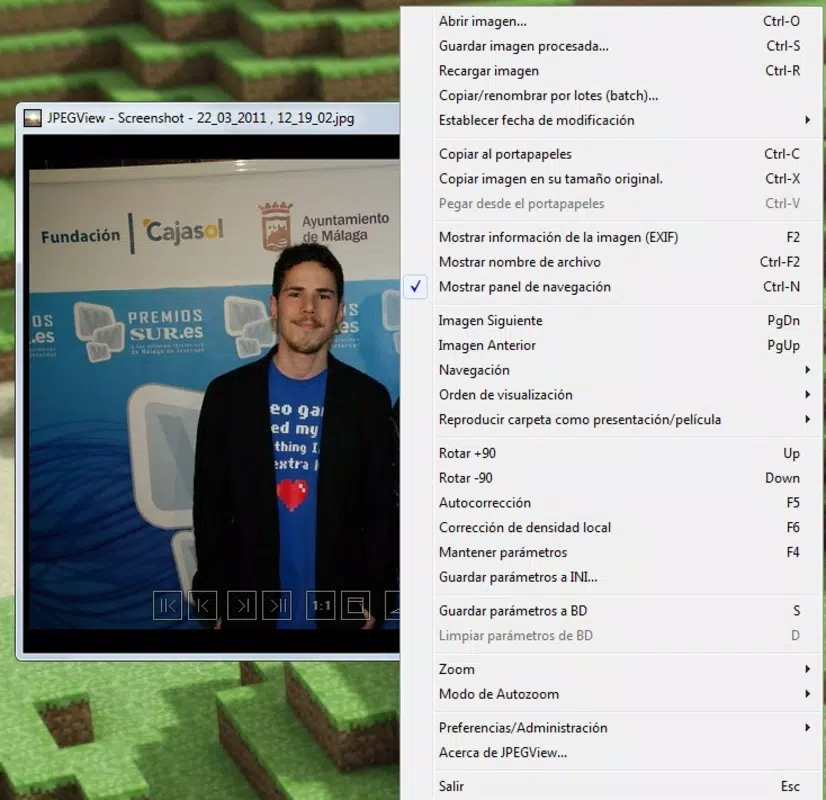
- Minimalist Interface: The clean, uncluttered layout prioritizes image visibility and ease of navigation. Users can focus on their photos without distractions from complex menus or toolbars, ideal for quick reviews and batch processing.
- Basic Editing Tools: Built-in functions for rotating and resizing images allow users to make simple adjustments directly within the viewer. This eliminates the need to switch between applications for minor edits, improving workflow efficiency.
- EXIF Information Display: Users can access detailed metadata such as camera model, aperture, shutter speed, date and time of capture, and GPS location. This feature is especially useful for photographers analyzing shooting conditions or organizing image libraries.
- Automatic Color Correction: The app applies intelligent enhancements to improve image contrast, brightness, and color balance. This feature helps deliver more visually appealing results without requiring manual adjustments, saving time in post-processing workflows.
- Portability and Lightweight Design: JPEGView Portable runs directly from external storage without installation. Its minimal footprint ensures it operates smoothly on older or low-resource devices, making it suitable for use in diverse computing environments.
For example, a photographer reviewing images on a client’s laptop can quickly load photos, check EXIF data, and apply color correction without installing software. Similarly, a student presenting digital work can use the app from a USB drive without altering the host system. These real-world use cases demonstrate its practicality and versatility.
Interface, UX & Performance
The user interface of JPEGView Portable is intentionally simple, emphasizing functionality over visual flair. Navigation is straightforward, with common actions like opening files, rotating images, and viewing metadata accessible through clearly labeled buttons or keyboard shortcuts. The design avoids clutter, ensuring that users can interact with the app efficiently even under time pressure.
Although the developer did not list formal performance metrics, the app’s lightweight nature suggests it loads quickly and consumes minimal memory and CPU resources. This contributes to smooth operation across various device categories, including older machines or systems with limited processing power. Responsiveness is maintained during image transitions, zooming, and metadata retrieval.
Stability appears to be a focus, as the app avoids unnecessary background processes and external dependencies. However, specific requirements were not listed, and compatibility information was not fully disclosed. Users should ensure their system meets basic Windows compatibility standards. Overall, the experience reflects a mature, well-optimized tool built for reliability and speed.
Platform Compatibility & Technical Requirements
JPEGView Portable is designed for Windows operating systems. The application is available as a portable executable, meaning it does not require installation and can be run directly from a USB drive or other removable media. The file size is not specified in the provided information, but the app’s lightweight nature indicates it occupies minimal disk space.
Specific OS versions or hardware requirements were not listed by the developer. The app’s portability suggests broad compatibility with recent Windows releases, but users should verify system readiness before use. The developer did not specify minimum OS requirements, so installation on older or non-standard systems may require testing.
Pros and Cons
Pros
- Lightweight and fast-loading image viewer with minimal system impact
- Portable execution from USB drives or external storage
- Supports EXIF metadata viewing for detailed image analysis
- Includes automatic color correction for improved image appearance
- Offers basic editing tools like rotation and resizing within the viewer
Cons
- Advanced editing features are not available
- Specific technical requirements were not disclosed
- Limited to Windows platform (no information on iOS or Android support)
- No built-in image export or batch processing capabilities
- Developer did not provide update frequency or support details
FAQ
Is JPEGView Portable safe to use?
Yes, the app is designed as a standalone executable without external dependencies, reducing the risk of malware. It can be scanned with standard antivirus tools before use.
Can I use JPEGView Portable on a USB drive?
Yes, the app is specifically built for portability and can be run directly from a USB flash drive or memory card without installation.
Does JPEGView Portable support all image formats?
While the app is optimized for JPEG files, it may support additional formats. Specific format compatibility was not listed by the developer.
Is JPEGView Portable free to download and use?
Yes, the app is available at no cost. No licensing fees or in-app purchases are required.
How often is JPEGView Portable updated?
The developer did not specify update frequency. Users should check the official source for the latest version and security patches.
Final Thoughts
JPEGView Portable delivers a focused, efficient solution for users who need a reliable image viewer with essential features. Its portability, lightweight design, and support for EXIF data make it a valuable tool for photographers, students, and professionals who work across multiple devices. While it lacks advanced editing capabilities, it excels in simplicity and speed, offering a practical alternative to default Windows viewers.
For those seeking a secure, free, and easy-to-use image tool that runs without installation, JPEGView Portable stands out. It balances functionality with minimalism, providing real value in everyday workflows.
Download JPEGView Portable now


